Allthebenefitsofpaper.Noneofthefriction.
Caret is red-pen editing without the retyping. Mark up any document with your Apple Pencil exactly like you would on paper. Caret reads your marks and writes them straight into the original file.
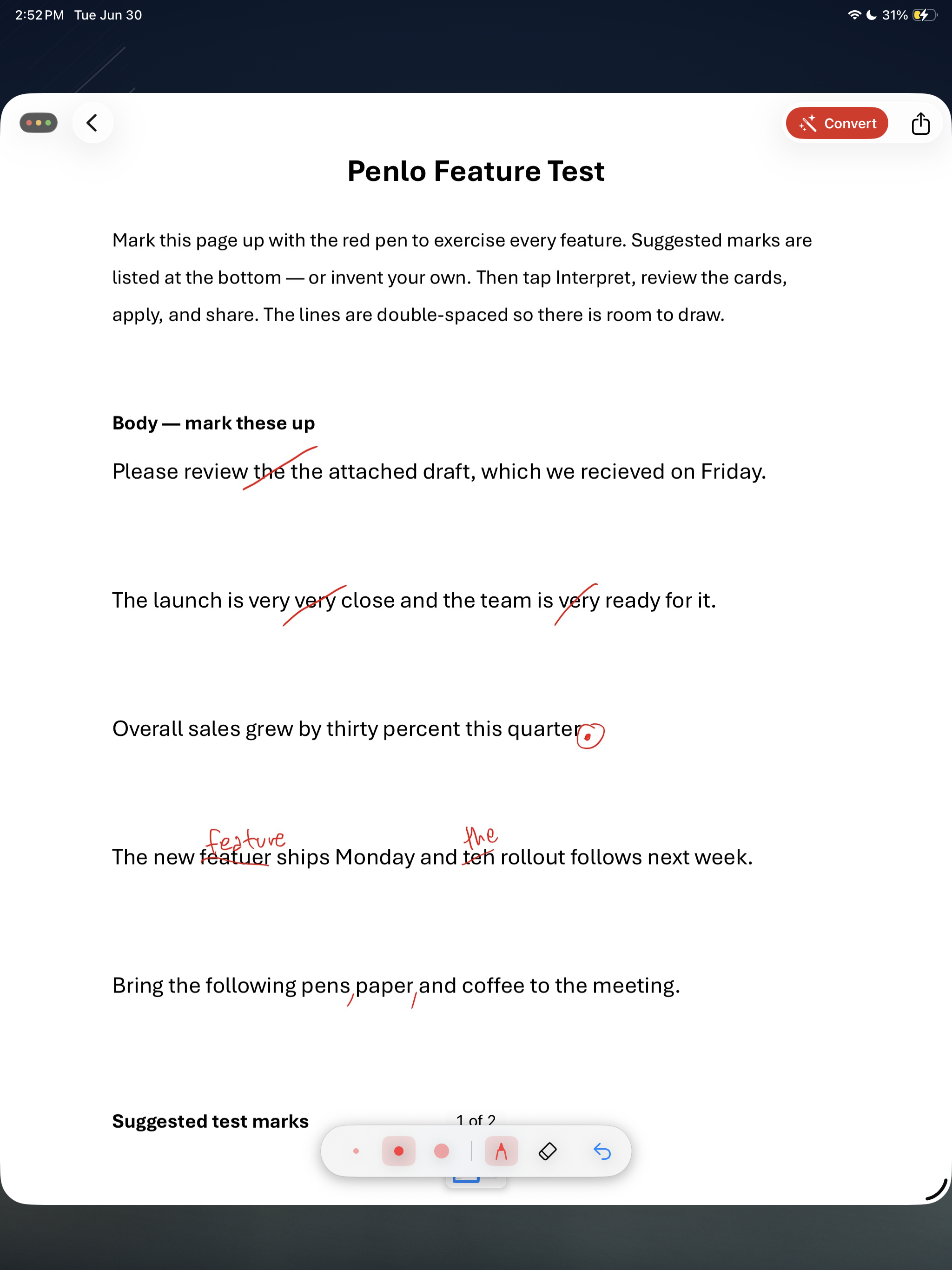
AI read 6 marks
edits ready to apply
Red marks
0
studies show you comprehend more on paper than screens*
0.0s
avg. AI processing
Zero
paper wasted. Ever.
*Meta-analysis of 54 studies, 171,055 readers: paper beats screens for reading comprehension. Delgado et al., Educational Research Review (2018).
"The natural feel of paper, at the efficiency of digital."
Why paper?
Paper is still the best editor.
Editors, lawyers, teachers: the people who edit for a living still print documents and mark them up by hand. Not out of habit. You genuinely catch more errors on paper, it's tactile, studies show handwriting improves memory and cognition, and every word stays your call. Real editing, not prompting an AI to rewrite for you.
But for people who edit by hand, there has never been a good way to get those marks back into the digital file:
The outdated process
Caret
Same marks. On your iPad.
Strike a word, caret in a new one, dot in a period. The exact marks you'd make with a red pen. Caret reads them and writes the edits straight back into your .docx, formatting intact.
No printing. No sitting back down to retype. Mark it up, cap your pen, the document's done.
Zero re-typing. Ever.
Marks applied automatically in seconds
Try it
Dragtoseeitwork.
Red marks on the left. The finished document on the right. Caret does the part in between.
The the report reveals surprising data about reading habits in the digital age. Researchers found that readers retain moreinformation from physical media
You approve everything
You're fully
in control.
Caret never changes a word without your sign-off. Every mark becomes a proposed edit you approve or reject, one by one or all at once. The AI does the retyping to make your life easier; the red pen stays in your hand. And it works on any .docx:
.docx No special template neededHow it works
Foursteps. Zerotyping.
From handwritten marks to a clean Word document, in seconds.
Mark it up
Open any Word document in Caret on your iPad. Pick up your Apple Pencil and mark it up exactly as you would on paper: red strikes, caret insertions, circled words, period dots.
Caret reads your marks
The moment you lift your Pencil, Caret's AI scans the red ink. It recognizes strikes as deletions, carets as insertions, circles as emphasis markers, and dots as punctuation. Just like a professional copy editor.
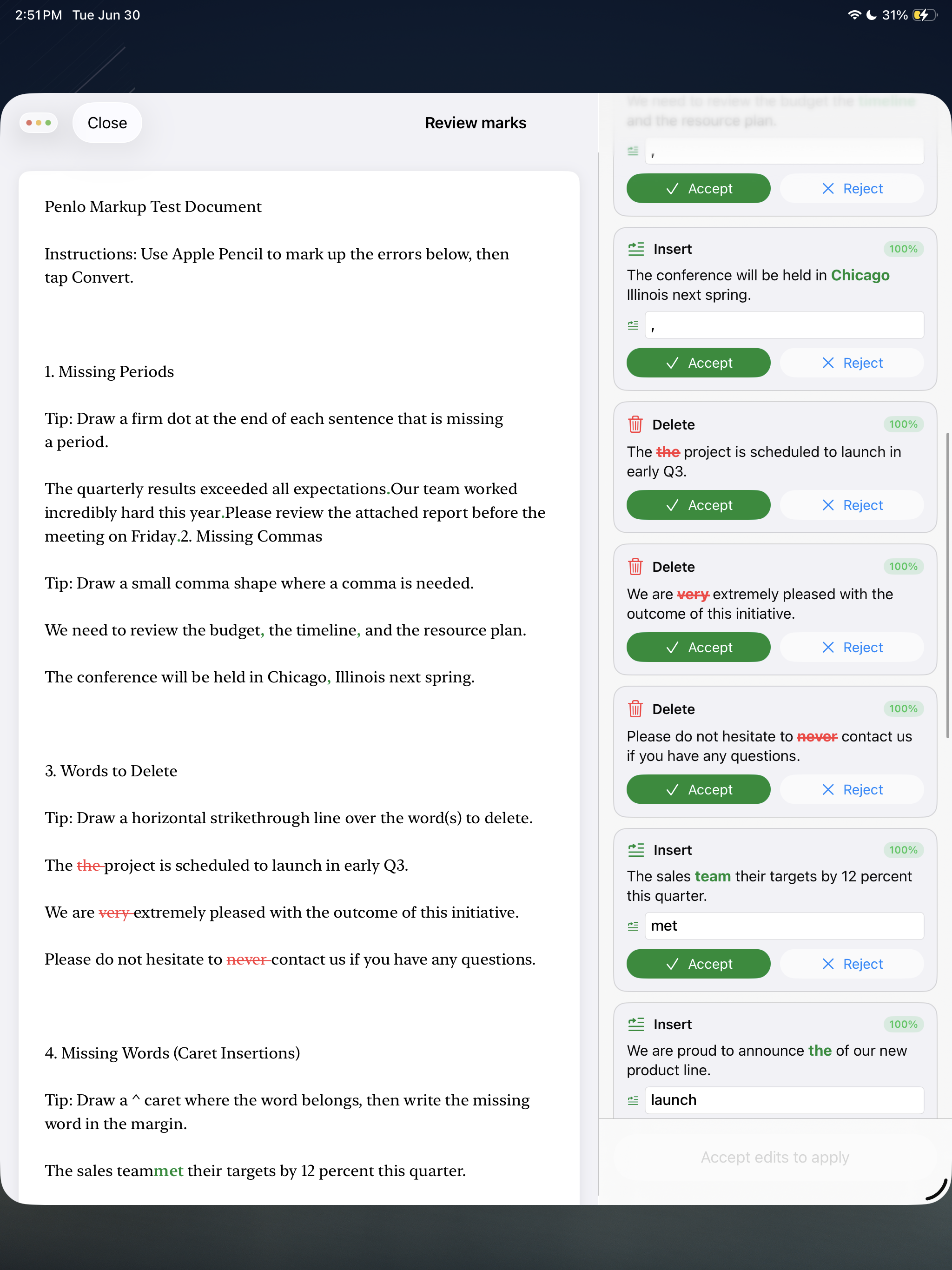
Review the changes
Caret shows you a clean summary of every edit it detected: what will be deleted, what will be inserted. Approve all at once or tweak individual changes before applying.
chapter-draft.docx
All 3 edits applied
Export your clean .docx
Caret writes every change back into the original Word file. Formatting, styles, track changes: all intact. Share it, email it, open it in Word. It's just a normal .docx, done.
Features
Builtforpeople
whopreferpaper.
Keeps your formatting
Hand-retyping edits is how styles, numbering, and headers get broken. Caret writes changes into the file the way Word does, so every detail survives untouched.
Fonts, styles, tracked changes, all preserved
Real .docx output
No proprietary format, no lock-in. You get a standard Word file that opens anywhere: Word, Google Docs, Pages.
Fast recognition
Caret reads your marks within seconds of lifting the Pencil. No tap, no button.
Works on any .docx
Contracts, manuscripts, essays, reports, scripts. If Word opens it, Caret marks it. No special template, no reformatting your work to fit the tool.
Theses · Contracts · Articles · Scripts · Reports
Original never touched
Every edit lands in a fresh copy. Your source file stays exactly as it was. You can't lose work you didn't approve.
Non-destructive by design
Beta testers
Beoneofthefirst.
Caret is in private beta. We're inviting a small group of beta testers who edit on paper every day. You get free early access, the 40% launch discount, and a direct line to the founder. We get your brutal feedback.
Editors & proofreaders
You mark up manuscripts for a living. Help us get every proofreading mark right.
Lawyers & paralegals
Redline the contract by hand. Skip retyping the changes into Word.
Academics & grad students
Advisor markups, thesis drafts, and revision cycles without the busywork.
Stopretypingyouredits.
Caret is launching on the App Store soon. Join the waitlist to get early access and a 40% launch discount.
No spam, ever. Unsubscribe any time.